Cover Lock
Just open/close the cover to turn screen on/off.
Or you can turn screen on/off just by touch the proximity sensor.
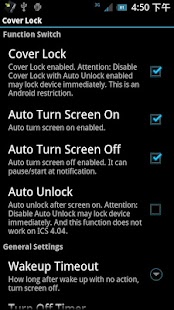
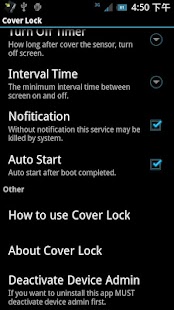
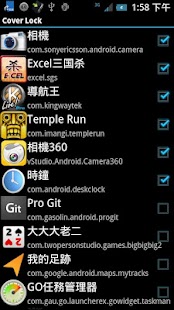
Features.1.Auto turn screen on2.Auto turn screen off3.Auto Pause screen off function by app4.Auto Pause screen off function by horizontal screen5.Auto unlock6.Screen off tips.7.Pause screen off function by shortcut or notification.8.Turn screen off by Widget.9.Auto stop at sleeping time,and restart after sleep.10.double touch proximity sensor to turn screen on11.auto pause at phone call
P.S.1.
After running big app system may kill this app, you can use shortcut or notification to restart this app.2.
When leaving app using back button not home, otherwise the setting page may show again when screen on.
3 If you want to uninstall this app MUST deactivate device admin first.4.
I use force screen off after turning screen on without unlock, so even if you touch the screen, the screen also will turn off unless finishing unlock.
Because Android 4.1.2 and 4.2 have wakelock bug.
It doesn't auto turn screen off.
If you just want auto screen on, you can use my another app "Auto Screen On", it has g-sensor and proximity sensor to screen on, and has log function to watch how the app work.
And it's free and no ads.
Some tablet may not have proximity sensor, please check it first.
If the device doesn't have proximity sensor, it would show "the device doesn't have proximity sensor".Please don't give me one star just because your device doesn't have the proximity sensor.
If you want more function, mail to me.
ISSUE:1.The proximity sensor on Galaxy Note II can't detect Dark cover/flip, so it may not work fine.2.The big sunshine may let the proximity sensor return wrong signal.
Thanks Владимир Бывалов for translating to Russian language.Thanks Manuel García for translating to Spanish language.Thank s Андрей Кравцов for adjust Russian language
Tag: Cover, Smart Cover, tap, lock, smart lock, screen off, screen on, power saver, tab, one touch, unlock
About Cover Lock
- Package name (App ID)
- com.omd.coverlock
- Available on
- Google Play
- Price
- Free
- Version
- v1.8.6
- Developer
- LuuTinh Developer
Looking for the Cover Lock APK?
The safest way to get Cover Lock (com.omd.coverlock) on your Android device is to install it directly from Google Play — you'll always get the latest official version, automatic updates, and no risk of modified or infected APK files from third-party sites.
Food & Dining
Discover recipes and order food from your favorite restaurants.
Smart Home
Control and monitor your home with smart features.
Automotive
Manage and monitor your vehicle with smart features.
See Cover Lock in Action
Frequently Asked Questions
Is Cover Lock free?
Yes, Cover Lock is free to download and install on Android through Google Play.
How do I install Cover Lock on Android?
Open Google Play on your Android phone or tablet, search for Cover Lock by LuuTinh Developer or tap the Google Play button on this page, then tap Install. The app downloads and installs automatically.
What is com.omd.coverlock?
com.omd.coverlock is the App ID (package name) of Cover Lock on Google Play. Every Android app has a unique package name, and it is the safest way to verify you are installing the official app.
Is Cover Lock safe to download?
Installing Cover Lock from Google Play is the safest option: you get the official version published by LuuTinh Developer, verified by Google Play Protect, with automatic updates. Avoid APK files from unofficial third-party sites.
Get Cover Lock Today
Cover Lock for Android — free download on Google Play.
Compatible with Android phones and tablets — available on Google Play.
Ask AI about this app
Get instant answers about features, tips and more from popular AI assistants.